
When to leave for the next one
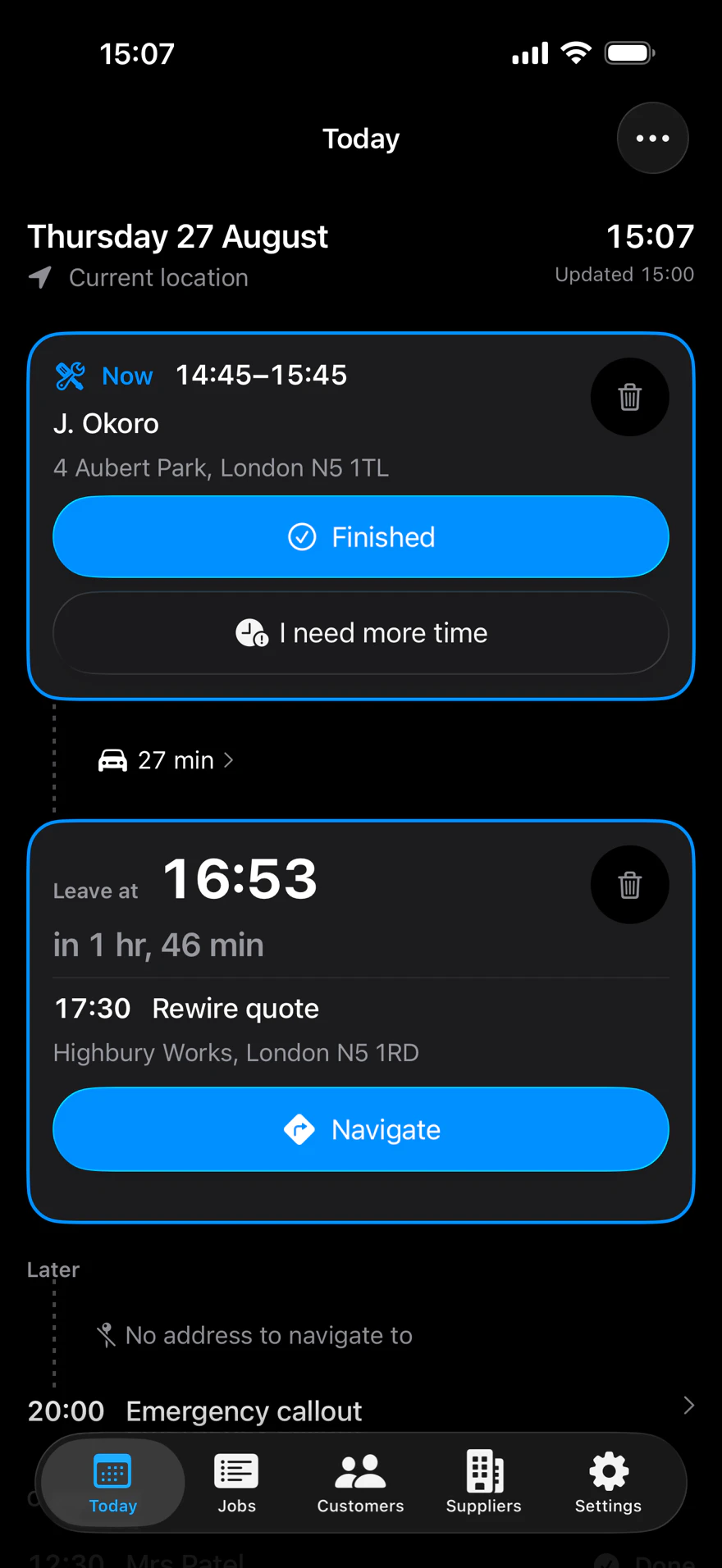
The start time, less the drive, less the buffer you set. One number, counting down, so you are not working it out on somebody’s doorstep.
Read howMAKE THE MOST OF YOUR TIME WITH ONE APP
See You Soon is a free iPhone app for tradespeople. It reads the calendar you already keep and works out when to leave for each job, against the traffic that is on the road now.
See You Soon does all the heavy lifting, calculating what time you need to leave and how many jobs in the area you can fit into your day. Making the most of your time (and your customer’s too).
When the day doesn't quite go to plan, See You Soon helps you communicate the updated time to your customer effortlessly, keeping them informed and happy.
WHEN THINGS HAPPEN OUTSIDE YOUR CONTROL
01The problem
You said two o'clock. It is ten past, you are still in traffic, and they are wondering where you are.
See You Soon has customisable message templates you can send to the customer without typing, automatically including your updated time of arrival from your current location. 'Hi Mrs Smith, sorry I'm late, I'll be there at 2.30, not 1.15. Apologies, Sam'. You read it, send it, and get back to the job.
02The problem
The current job is overrunning. You've three more jobs to do and calling them all is only going to delay you more.
Tell See You Soon how much longer you need and it calculates the diary changes, including travel time. Then queues up your text messages to your customers to let them know. All you have to do is tell it how long you need and hit send.
03The problem
“When can you come?” Someone calls about a new job, and you are guessing from a calendar that knows nothing about driving.
See You Soon gives you a fortnight of availability that knows about the driving, and a slot finder that proposes the times adding the least of it. Times that would make you late for a job you have already booked are not offered at all. It's almost like having a personal assistant in your pocket.
04The problem
Traffic turned while you were under a sink. You find out when you get in the van.
The day recalculates against the roads as they are. If the leave time moves earlier by a margin worth knowing about, you are told. The baseline is what you were last told, so a journey that degrades three minutes at a time cannot creep past you.
05The problem
The event says “Highbury Works” and nothing else. You are ringing the customer from the van to ask where they are.
A job with no address is marked plainly so you don't get surprised, and the app writes the text that asks the customer for it, so you can send it without effort and update your route accordingly.
06The problem
Ten times an hour you stop what you are doing, with your hands full, to work out when you need to leave.
The calculation is done for you, all day, and redone whenever the diary changes or the traffic does. Reduce worries, increase earning. That is See You Soon in four words.
On the phone
You would be doing these between jobs, in your head, with a customer waiting. It does them instead, and it is working properly when you barely open it.
The start time, less the drive, less the buffer you set. One number, counting down, so you are not working it out on somebody’s doorstep.
Read how
Asked in a kitchen, answered where you stand. Times that suit the driving you have already got booked, with the reason written under each one.
Read howEvery journey is costed against the traffic that is on the road now, not last Tuesday’s. If it turns while you are on a job, you hear about it while you can still move.
Read how
Say how much longer. It shows you the rest of the day before it moves anything, and only the customer actually left waiting is offered a text. You send it.
Read howLine by line
What lateness actually costs
Nobody writes a review about a plumber who arrived at two o’clock. They write one when they booked a half day off, sat in all afternoon, and heard nothing until you knocked at half four.
Most of that complaint is not the lateness. It is the silence. People forgive a delay they were told about, and the telling is the bit that gets skipped, because you are under a sink with your hands full and no idea yet what the real new time is.
The app cannot make you punctual. What it can do is tell you when to leave, and when you are genuinely going to be late, work out who is actually affected and write them the message before they start wondering.
Hours before
Just confirming I'm booked in with you at 14:00 today.
At the leave time
On my way to you now, should be with you about 14:45.
When the arithmetic says somebody will wait
The real revised arrival, rounded up, not an apology for being five minutes over.
The app writes them. You read them, change them if you want, and press send.
No server. No account. No sign-in.
Your jobs, addresses and customers are read on your phone, used on your phone, and kept nowhere else. The only traffic the app causes is the directions request iOS makes to Apple Maps, exactly as the Maps app does. The App Store privacy label reads Data Not Collected, in every category.
iPhone, iOS 18 and later. Free, permanently. Nothing is gated, and nothing ever will be.