How it works
One sum, done for you, all day
See You Soon is a free iPhone app for tradespeople. It reads the calendar you already keep, works out when to leave for each job with travel times from Apple Maps, and writes the text to send when you are running late. You send it. It needs calendar access and iOS 18 or later.
The app answers one question before any other, and everything else on the screen is supporting detail.
Leave time=job start−travel time−your buffer
A 16:00 job, 27 minutes away, with a 15 minute buffer, means leaving at 15:18. That is the number on the card, and it is the only one you have to read.
Three steps
What actually happens
It reads the diary you already keep
Every calendar you leave switched on, across every account on the phone. Birthdays, holidays and cancelled events are ignored. You are never asked to duplicate anything, and there is no second diary to disagree with the first.
It costs every journey with travel times from Apple Maps
By car, on foot or on public transport, your choice. The next journey is costed from where you are now. Later journeys from the job before them. Where public transport times are not published for a route, it says so and gives you the driving time rather than nothing.
It puts one number on the screen
The leave time, in the largest type on the page, with a countdown that ticks each minute. When the moment comes, it tells you. If the traffic turns while you are on a job, it tells you that too, early enough to do something about it.
Your day
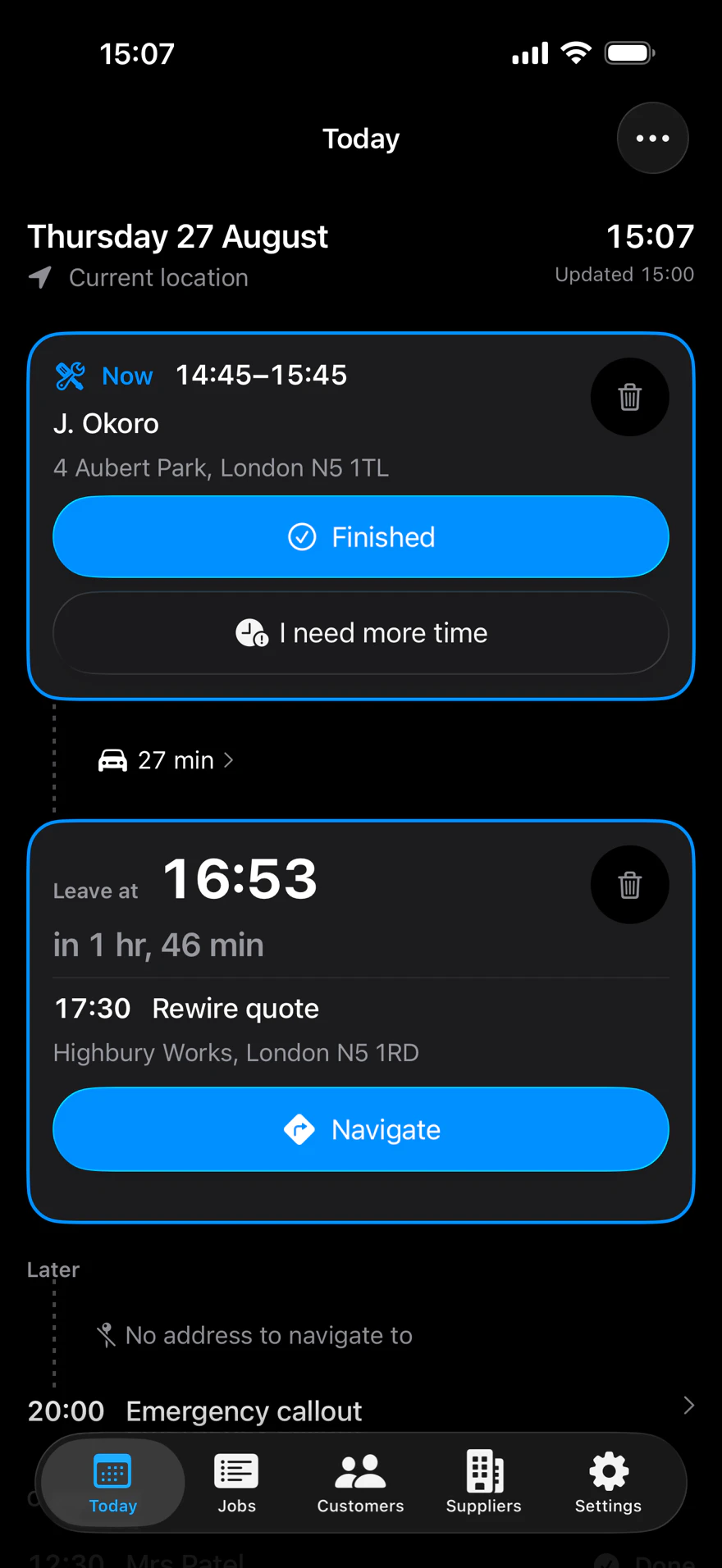
See You Soon reads today's jobs from the calendar on your iPhone and shows the next one with a leave time and a countdown. The leave time is the job's start, less the travel time from Apple Maps, less your buffer, which is 10 minutes until you change it. It needs an address the map can place, a route, and somewhere to start from.
Finding the address
See You Soon reads each job's address from the calendar event itself. It tries the event's map location, then the location text, then an Apple Maps link, then a notes line with a UK postcode. A job with no address keeps its place in the day, and "Add" or "Here" writes one onto the event.

Alerts
See You Soon has five alerts: a reminder before leave time, "Leave now" at leave time, "Running late" 5 minutes after, "Leave earlier" when the journey gets longer, and "Where are you?" for a job with no address. They need notifications allowed. The first three come from the last plan made while the app was open.
Every one carries the same three actions
Running late
When a job runs over, tap "I need more time" and say how much longer. See You Soon lists each later job with its booked time and its new time. "Update my day" moves them in your calendar. "Keep everyone informed" then writes a text for each customer kept waiting, and you send each one.

Customer texts
See You Soon writes the text for the moment: confirming a booking, on my way, I could be early, still on track, running late, and asking for the address. It fills in the times and opens the text unsent in the iPhone's message sheet. You read it, change it if you want, and send it.
Booking
"Find a time" searches the next 14 days inside your working hours and suggests up to 5 times, each with its reason. With the job's address and length, and a connection, it ranks them by how little driving they add, and puts days you are already working nearby first.

Customers and suppliers
See You Soon lists your customers and suppliers from the contact groups you choose on your iPhone. Each customer shows their last job and their next one. Each supplier has Navigate, Call and Message. People you add in the app are saved to your Contacts. It needs contacts access and a contact group chosen.
Your data
See You Soon has no account and no server of its own. It reads and writes your own calendar and contacts through iOS, and keeps only its settings on the phone. Route and address lookups go to Apple Maps. Your calendar and contacts may sync through your own accounts, as they did before you installed the app.
It opens on the tab that matters.
Flat, shallow, no hidden drawers, never more than two screens deep. It always opens on today, and it never restores a stale scroll position from yesterday: your day has moved on since you last looked.
Today
The screen the app exists for. The job you are standing in is pinned to the top so you never scroll to find out where you already are. The next one leads on its leave time. Finished jobs stay on the screen, dimmed, because you may still need that address.
Jobs
Everything booked and everything done, in one list. Past, Today and Upcoming as three segments, month headings with the year on them, a date picker to jump straight to March 2024, and search by customer, job or place. It tells you the range it has actually loaded, because a diary that quietly ended at the edge of what it read would look exactly like a diary that ended.
Customers
The people you work for, where they are, when you were last there and when you are next due. One tap to Navigate, Call or Message. They come from a group you already keep in Contacts, and with no group picked the tab asks for one rather than listing everybody in your phone.
Suppliers
The merchants and builders' yards you buy from, on the same footing as your customers. Name, town, number, and one tap to ring the trade counter or drive to it.
Settings
Short on purpose. Travel mode, buffer, working hours, reminders, which calendars to read and which of those hold jobs, contact groups, and the wording of every message the app writes.
Booking
Adding a job without leaving the app
It reads your diary, and it can add to it. One way only, and never behind your back.
You see the day you are booking into
The new job sits in time order among the ones already there. When the drive will not fit, it says which job it clashes with, or which gap is too short and by how much, or plainly that it could not tell.
It never blocks Save
The app knows the driving time and nothing else. Not the shortcut, not the key safe, not that the job before is a twenty-minute call-out booked as an hour. It says what it sees, once, and gets out of the way.
It writes back where you can read it
Customer name and number go into the event notes, in the shape the app reads back, so the job shows up complete in Apple’s Calendar too. You choose which calendar it saves to, and only calendars that can actually be written to are offered.
Contacts stay yours
You can look a customer up while booking, and add a new one into a group you already keep. The app never creates, renames or empties a group, and never alters or deletes anybody.
Every message it writes, in your words
Confirming a job, on my way, running late, asking for an address: nine of them, each with the real time already filled in. You can rewrite any of them in Settings. The editor shows the message with a real-looking time in it and you type around it, so there is no notation to learn, no merge field and no curly brackets.
Your sign-off goes on the end of all of them, because a text from a number the customer has not saved is a text that does not get read. The app writes them. You press send.
When it recalculates
Not on a timer alone. The day is rebuilt whenever something has actually changed, so the number on the screen is never a stale one presented as live.
- When the diary changes, including an edit made in Apple’s Calendar app
- When you set off
- When you bring the app to the front
- On an interval you choose, five minutes by default
When it cannot work it out
Degrading is a designed state, not a failure. Three things happen rather than an error message.
The card says “Starts at”
Where travel cannot be costed, the same card answers the same question with less, rather than showing a blank space.
The estimate admits its age
If the network drops, the last good leave time stays on screen and says how old it is.
“Can’t tell” is a real answer
A missing travel time is never treated as zero. That would report the afternoon as comfortably on time, which is a wrong answer that looks like a right one.
Zero setup
Grant calendar access and it is useful immediately. No onboarding wizard you cannot skip, no data entry, no duplicate diary to maintain.